> For the complete documentation index, see [llms.txt](https://sixnetwork.gitbook.io/definix-on-klaytn-en/llms.txt). Markdown versions of documentation pages are available by appending `.md` to page URLs; this page is available as [Markdown](https://sixnetwork.gitbook.io/definix-on-klaytn-en/yield-farming/how-to-yield-farm-on-definix.md).

# How to Yield Farm

#### 1. Choose one in the Farm to yield. [**Go to see Farm**](https://g2.klaytn.definix.com/farm)

<div align="left"><img src="https://2110127189-files.gitbook.io/~/files/v0/b/gitbook-x-prod.appspot.com/o/spaces%2F-McOSvfntR405oMOSs-r%2Fuploads%2F707Uxa2PVuDCV8kWWykP%2Ffarm%200.png?alt=media&amp;token=01ae84da-87bf-4ef5-a842-ae8ec599fd88" alt=""></div>

#### 2. Unlock the decentralized wallet of your choice. &#x20;

<div align="left"><img src="https://2110127189-files.gitbook.io/~/files/v0/b/gitbook-x-prod.appspot.com/o/spaces%2F-McOSvfntR405oMOSs-r%2Fuploads%2Ffpkou0plG3qZBONmz8sq%2Fswap%202.png?alt=media&amp;token=d9d890b2-1727-4c2f-b2d2-7712856b4161" alt=""></div>

#### 3. Click “Approve Contract” of the farm you want deposit, and confirm the transaction on your wallet.&#x20;

![](https://2110127189-files.gitbook.io/~/files/v0/b/gitbook-x-prod.appspot.com/o/spaces%2F-McOSvfntR405oMOSs-r%2Fuploads%2FBrWIq6N9eRdb4hoOCwNi%2Ffarm%203.png?alt=media\&token=84748e66-e307-4478-8434-e22bf833683b)

#### 4. Click the “+” button.

Please get LP tokens before you use Farm. [**Get LP tokens**](https://g2.klaytn.exchange.definix.com/liquidity)

<div align="left"><img src="https://2110127189-files.gitbook.io/~/files/v0/b/gitbook-x-prod.appspot.com/o/spaces%2F-McOSvfntR405oMOSs-r%2Fuploads%2FwX8vMzEExUwEjfyq5khx%2Ffarm%204.png?alt=media&amp;token=372f4ac6-5739-409f-b7e4-260a08b4994f" alt=""></div>

#### 5. Input the amount and click "Deposit".

<div align="left"><img src="https://2110127189-files.gitbook.io/~/files/v0/b/gitbook-x-prod.appspot.com/o/spaces%2F-McOSvfntR405oMOSs-r%2Fuploads%2FFYJ81NCjAHzCXaiqNCOh%2Ffarm%205.png?alt=media&amp;token=e0a61d55-8cd5-43ba-8a87-e712e1a5f60d" alt=""></div>

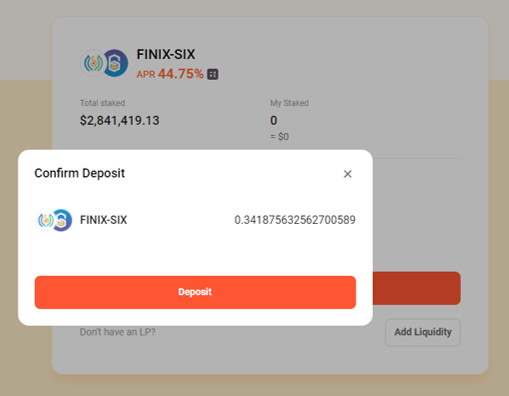
#### 6. Check the amount, click "Deposit" and confirm the contract on your wallet.&#x20;

<div align="left"><img src="https://2110127189-files.gitbook.io/~/files/v0/b/gitbook-x-prod.appspot.com/o/spaces%2F-McOSvfntR405oMOSs-r%2Fuploads%2Fevzol5vOMLkWwYrmSqbM%2Ffarm%206.png?alt=media&amp;token=58968ae4-318d-4343-bcc5-1105ada18834" alt=""></div>

#### 7. Once the transaction is made, My liquidity, Earned Token appear. Click "Harvest" when you want to harvest your reward.

<div align="left"><img src="https://2110127189-files.gitbook.io/~/files/v0/b/gitbook-x-prod.appspot.com/o/spaces%2F-McOSvfntR405oMOSs-r%2Fuploads%2Fl19lxb0qRycQXKYpzuWW%2Ffarm%207.png?alt=media&amp;token=eee8791d-2c3b-4bbb-826d-6cef0df27f80" alt=""></div>